
What are partial responses?
Have you ever encountered a situation where a respondent started filling out a survey but abandoned it before completing it? Partial responses allow access to exactly these kinds of incomplete surveys. Each time a respondent clicks the “Next page” button, their answers up to that point are saved in our database.
DISPLAY
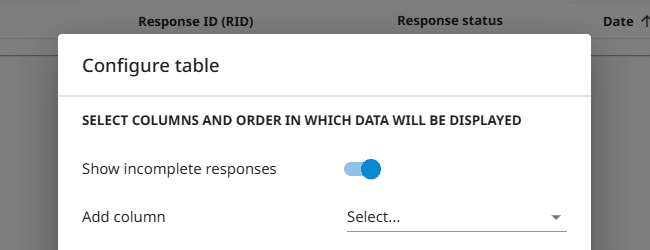
To display partial responses :
- Go to the List of responses.
- Click the
![[S]](https://www.surveylab.com/UserFiles/640d81fbf8d6/Image/ico_material/baseline_settings_black_18dp.png) Settings button.
Settings button. - Check the Show incomplete responses option.
 Functionality is available for the Starter, Advanced, Professional, and Enterprise plan.
DOWNLOAD
To download partial responses :
- Select the survey for which you want to download responses and click
![[R]](data:image/svg+xml,%3Csvg%20xmlns='http://www.w3.org/2000/svg'%20viewBox='0%200%2018%2018'%3E%3C/svg%3E) REPORT.
REPORT.
- Then choose the report and click the Export button.

- Select the desired export file format.
![[R]](https://www.surveylab.com/UserFiles/640d81fbf8d6/Image/ico_material/baseline_bar_chart_black_18dp.png) REPORT.
REPORT.
![[D]](https://www.surveylab.com/UserFiles/640d81fbf8d6/Image/ico_material/baseline_cloud_download_black_18dp.png) Export button.
Export button.
NOTE. Partial response data is only available when a respondent starts the survey and moves from the first to the second page.
Partial responses can be downloaded using the survey results export feature or via the SFTP mechanism.
Functionality is available for the Enterprise plan.