
Randomization
Functionality allows for rotation and randomization of survey questions, pages, and blocks of pages. Thanks to this feature, each respondent will see pages and survey questions in random order. You can also mark pages and questions that shouldn’t change order and always stay in the same place.
Questions
To add question rotation :
- Press
![[E]](data:image/svg+xml,%3Csvg%20xmlns='http://www.w3.org/2000/svg'%20viewBox='0%200%2018%2018'%3E%3C/svg%3E) DESIGN button.
DESIGN button. - Press MORE options button (page header) and turn on the Randomization on the page.

- Choose the type of randomization.

- Choose questions that should be included in the randomization.
- Press SAVE button.
![[E]](https://www.surveylab.com/UserFiles/640d81fbf8d6/Image/ico_material/baseline_edit_black_18dp.png) DESIGN button.
DESIGN button.![[O]](https://www.surveylab.com/UserFiles/640d81fbf8d6/Image/ico_material/baseline_more_vert_black_18dp.png) MORE options button (page header) and turn on the
MORE options button (page header) and turn on the  Randomization on the page.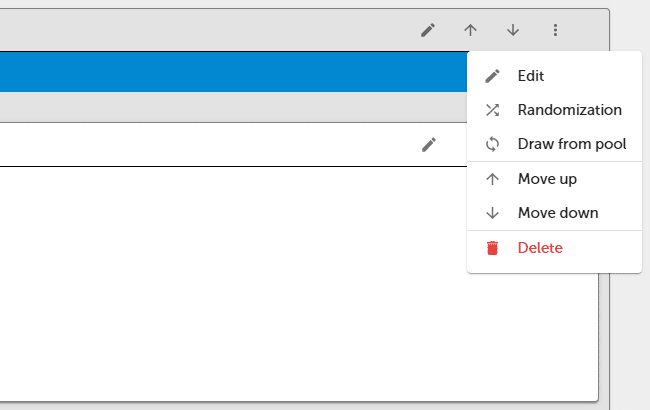
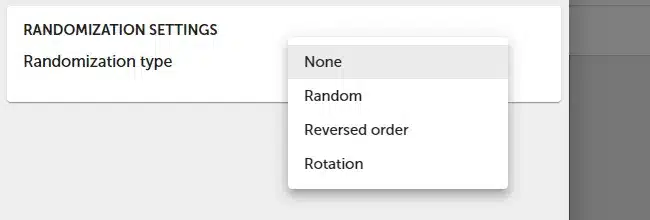
Pages
To add page rotation :
- Go to survey SETTINGS and select Display blocks.
- Go to the block header and press MORE options button.
- Press Randomization and select Randomization type.
- Select pages to be randomized.
Blocks
- Go to survey SETTINGS and select Display blocks.
- Press BLOCKS RANDOMIZATION and select Randomization type.
- Select blocks to be randomized.
Types of rotation
| Type | Description |
|---|---|
| None | Default order. |
| Random | Random order of pages / questions. |
| Reversed order | Respondent will see pages / questions in reversed order. |
| Rotation | The initial order of questions is random. Each subsequent respondent will see the questions/pages shifted by one position, for example: R1: Q1, Q2, Q3 R2: Q2, Q3, Q1 R3: Q3, Q1, Q2 … After the completion of a full cycle, the system will reset to the first question set and start a new cycle. |
NOTE. Data in the report will be presented in the same order as the questions are entered into survey. It means that the data is not randomized in the report.
NOTE. Survey logic doesn’t work with page rotation.
 Blocks rotation feature is available in the Professional and Enterprise plan.