
Can I export data to MS Excel?
Yes. With SurveyLab, you can export data and upload it to MS Excel or any other analytical tool.
To export data :
- Select a survey for which you want to export data.
- Press
![[R]](data:image/svg+xml,%3Csvg%20xmlns='http://www.w3.org/2000/svg'%20viewBox='0%200%2018%2018'%3E%3C/svg%3E) REPORT button.
REPORT button.
- Choose the report you want to download and press Download button.

- Select data format type.

![[R]](https://www.surveylab.com/UserFiles/640d81fbf8d6/Image/ico_material/baseline_bar_chart_black_18dp.png) REPORT button.
REPORT button.
![[D]](https://www.surveylab.com/UserFiles/640d81fbf8d6/Image/ico_material/baseline_cloud_download_black_18dp.png) Download button.
Download button.
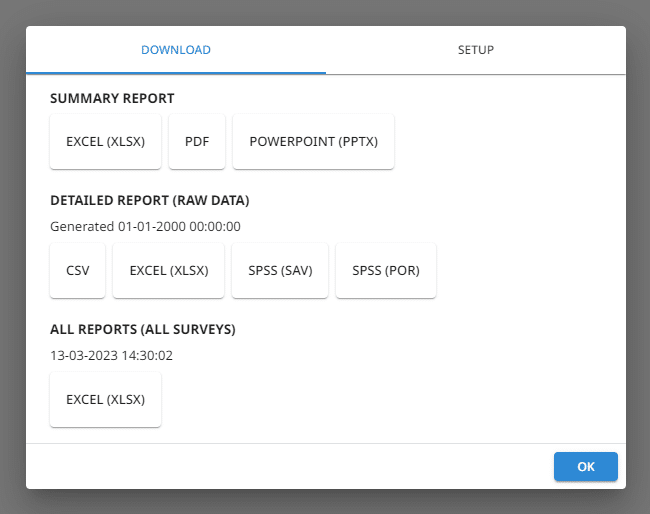
The system will generate CSV and XLSX files that can be easily uploaded into MS Excel or another program. You will also be able to generate SAV and POR files for usage in SPSS.
NOTE. CSV is an abbreviation of Comma-Separated Values. This is a popular text data format where values are separated by commas. XLSX are native MS Excel file format.
 Functionality is available in the Starter, Advanced, Professional, and Enterprise plans.