
Survey pre-population
This functionality allows you to set default (base) answer choices for selected questions. This way, your respondents will see pre-selected answer choices when they take a survey.
It is very useful when you create online forms, and you want to speed up the form completion process.
Manual pre-population
To pre-populate survey :
- Press
 Edit question button.
 - Select answer choices that will be displayed as a default choice.
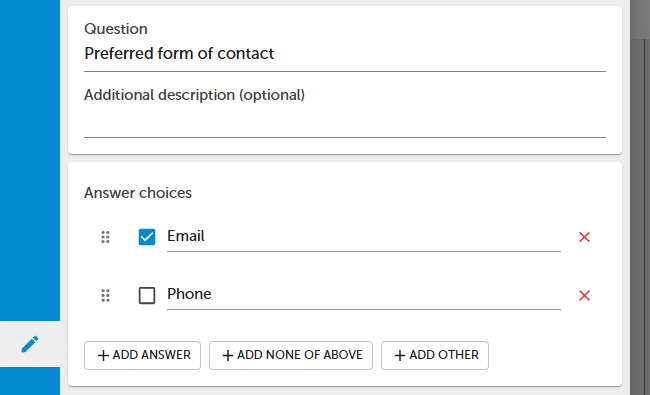
- To remove / deselect a pre-selected answer choice, just click it.
NOTE. Pre-population works for the choice question type.
API
You can automatically preselect answer choices using the URL API.
Example
https://www.surveylab.com/pageTag/SurveyCampaign/cId/27bb90cff4e465cfdd5f6/__sq_758469/1:id/__sq_938743/0:id/__sq_938744/2:id/__sq_938745/0:id/__sq_938742/1:id/__sq_938746/aaa
Questions preselected with the URL API need to be on the first page of the survey.
To check answer choice ID :
- Press Edit button, to edit question.
- Select API tab.
NOTE. You can also verify answer choice IDs (eg, __sq_758469) with the REST API.
 Functionality is available in the Advanced, Professional, and Enterprise plan.